Protect APIs with DPoP-bound Access Tokens
This guide explains how to use heimdall to protect an API with DPoP-bound access tokens issued by an OAuth 2.0 authorization server.
By the end of this guide, you’ll have a setup where heimdall protects an API with DPoP-bound access tokens issued by Keycloak. Although this guide uses Keycloak as authorization server, you can use the same approach with any OAuth 2.0 authorization server that issues DPoP-bound access tokens according to RFC 9449.
Overview
DPoP, short for Demonstrating Proof-of-Possession, sender-constrains OAuth 2.0 access tokens. Instead of treating an access token as a pure bearer credential, the client proves possession of the private key the token is bound to on every request.
Technically, the setup includes:
Keycloak - Issues DPoP-bound access tokens.
A DPoP-capable client - Requests an access token and creates DPoP proofs for calls to the protected API.
heimdall - Validates the access token and the corresponding DPoP proof.
traefik/whoami - Simulates the protected upstream service.
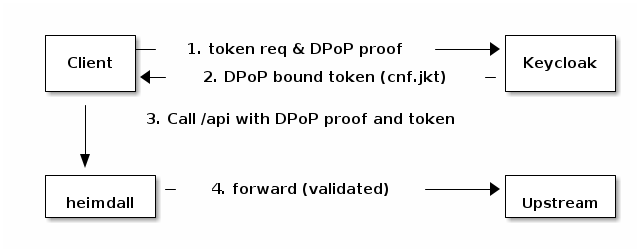
The DPoP-specific flow looks like this:
In this guide, heimdall is configured to require DPoP nonces. That means the first request to the protected API is answered with a nonce challenge. The client then repeats the request with a fresh proof that includes the nonce returned by heimdall.
| heimdall runs in proxy mode here, sitting directly in front of the upstream service and handling both DPoP validation and request forwarding in a single hop. The same functionality can also be achieved when heimdall is integrated with any reverse proxy as a decision service — the DPoP configuration stays exactly the same. See the proxy integration guides for Traefik, NGINX, Envoy, and others. We kept this guide to standalone proxy mode to avoid extra moving parts. |
Prerequisites
To follow this guide, you need the following tools installed locally:
Configure the Base Setup
Create a directory for the configuration files named
heimdall-dpop. Inside this directory, create two additional directories namedrulesandclient. Therulesdirectory will contain heimdall’s rules, and theclientdirectory will contain the DPoP client used to obtain tokens and call the protected API.mkdir heimdall-dpop cd heimdall-dpop mkdir rules clientCreate a configuration file for heimdall named
heimdall-config.yamlwith the following contents:log: (1) level: debug tracing: enabled: false metrics: enabled: false secret_management: (2) nonce_keys: type: jwks config: path: /etc/heimdall/secrets.jwks master_key: (3) source: nonce_keys selector: dpop-nonce-master-key-1 mechanisms: authenticators: - id: deny_all (4) type: unauthorized - id: dpop_jwt (5) type: jwt config: jwks_endpoint: url: http://keycloak:8080/realms/dpop/protocol/openid-connect/certs assertions: issuers: - http://keycloak:8080/realms/dpop - http://127.0.0.1:8080/realms/dpop allowed_algorithms: - RS256 - ES256 validity_leeway: 10s proof_of_possession: (6) type: dpop config: max_age: 1m nonce_required: true replay_allowed: false error_signaling: (7) enabled: true include_error_description: true include_dpop_algorithms: true finalizers: - id: noop (8) type: noop error_handlers: - id: default (9) type: default default_rule: (10) execute: - authenticator: deny_all - finalizer: noop on_error: - error_handler: default providers: (11) file_system: src: /etc/heimdall/rules watch: true1 By default, heimdall logs at the errorlevel. We set it todebugto see detailed information about rule execution and DPoP validation results. Tracing and metrics are disabled to avoid errors from a missing OTEL collector. For more details, see the Observability chapter.2 A secret source named nonce_keysbacked by a JWKS file. It provides the symmetric key material required for DPoP nonce generation and validation.3 The master_keysetting references the key that heimdall uses to generate and validate DPoP nonces. It must point to a symmetric key from a configured secret source. This setting is required whenevernonce_requiredis set totrue.4 The unauthorizedauthenticator nameddeny_allrejects every request. It is used by the default rule to lock down all endpoints that are not explicitly matched by a regular rule.5 The jwtauthenticator nameddpop_jwt. It validates access tokens against the JWKS endpoint directly. Two issuer values are configured because the token’sissclaim reflects the URL the client used when obtaining it: the browser-based Authorization Code flow reaches Keycloak at127.0.0.1:8080, while heimdall fetches the JWKS over the internal Docker network atkeycloak:8080.6 The DPoP proof-of-possession assertion. With nonce_required: true, heimdall rejects any request that does not include a valid nonce and issues aDPoP-Noncechallenge so the client can retry. Withreplay_allowed: false, heimdall rejects previously seen DPoP proofs based on theirjticlaim.7 Configures WWW-Authenticate error signaling according to RFC 9449. When DPoP nonce validation fails, heimdall returns a use_dpop_nonceerror in theWWW-Authenticateheader along with a freshDPoP-Nonceheader.8 The noopfinalizer passes the request to the upstream service without modifying it.9 The defaulterror handler returns a plain HTTP error response.10 The default rule acts as a security baseline: it rejects all requests that are not matched by a more specific rule. Regular rules inherit from this rule and only need to specify what they override. 11 The file_systemprovider loads rules from the/etc/heimdall/rulesdirectory and watches for changes.Create a file named
secrets.jwkswith the following contents:{ "keys": [ { "kty": "oct", "kid": "dpop-nonce-master-key-1", "k": "2M0G6EosV6PZq4N2FxmDqkJYb3mHkYaJzMX7Wm3Jj1o" } ] }Do not use this key for anything beyond this guide. Use your own securely generated key material in real deployments. Create a file named
upstream-rules.yamlin therulesdirectory with the following contents:version: "1beta1" rules: - id: upstream:api match: http: paths: - path: /api - path: /api/<**> forward_to: host: upstream:8081 execute: - authenticator: dpop_jwtThis rule matches requests to
/apiand any sub-path. It inherits the finalizer and error handler from the default rule and only overrides the authenticator, replacing the deny-all baseline with thedpop_jwtauthenticator that accepts DPoP-bound access tokens. Requests that pass validation are forwarded to the upstream service.Create the DPoP client. First, create a file named
pyproject.tomlin theclientdirectory:[project] name = "heimdall-dpop-smoke-client" version = "0.1.0" requires-python = ">=3.13" dependencies = [ "httpx==0.28.1", "pyjwt[crypto]==2.10.1", "click==8.4.1" ] [project.scripts] client = "dpop_client:cli" [build-system] requires = ["hatchling"] build-backend = "hatchling.build" [tool.hatch.build] include = [ "dpop_client.py" ]The
[project.scripts]entry exposes the CLI asclient, which letsuvinvoke it asuv run client <command>without specifying the file path.Then, create a file named
dpop_client.pyin theclientdirectory:from __future__ import annotations import base64 import hashlib import json import os import secrets import shutil import time import uuid from dataclasses import dataclass from http.server import BaseHTTPRequestHandler, ThreadingHTTPServer from pathlib import Path from typing import Any, cast from urllib.parse import parse_qs, urlencode, urlsplit, urlunsplit import click import httpx import jwt from cryptography.hazmat.primitives import serialization from cryptography.hazmat.primitives.asymmetric import ec from cryptography.hazmat.primitives.asymmetric.ec import EllipticCurvePrivateKey def env(name: str, default: str | None = None) -> str: value = os.environ.get(name, default) if value is None: raise click.ClickException(f"Missing required environment variable: {name}") return value STATE_DIR = Path(env("STATE_DIR", ".state")) KEY_FILE = STATE_DIR / "dpop-private-key.pem" OTHER_KEY_FILE = STATE_DIR / "other-dpop-private-key.pem" TOKEN_FILE = STATE_DIR / "token.json" RESOURCE_SERVER_DPOP_STATE_FILE = STATE_DIR / "resource-server-dpop-state.json" AUTHORIZATION_ENDPOINT = env("AUTHORIZATION_ENDPOINT") TOKEN_ENDPOINT = env("TOKEN_ENDPOINT") PROTECTED_API = env("PROTECTED_API") CLIENT_ID = env("CLIENT_ID") REDIRECT_HOST = "0.0.0.0" REDIRECT_PORT = int(env("REDIRECT_PORT", "8765")) REDIRECT_PATH = "/callback" REDIRECT_URI = f"http://127.0.0.1:{REDIRECT_PORT}{REDIRECT_PATH}" SCOPE = env("SCOPE", "openid profile email") @dataclass(frozen=True) class ApiResult: status_code: int body: str dpop_nonce: str | None www_authenticate: str | None @dataclass(frozen=True) class CallbackResult: code: str state: str @dataclass(frozen=True) class ResourceServerDpopState: access_token_hash: str proof: str nonce: str class CallbackServer(ThreadingHTTPServer): callback_result: CallbackResult | None callback_error: str | None def b64url(data: bytes) -> str: return base64.urlsafe_b64encode(data).rstrip(b"=").decode("ascii") def normalize_htu(url: str) -> str: parsed = urlsplit(url) return urlunsplit((parsed.scheme, parsed.netloc, parsed.path, "", "")) def access_token_hash(access_token: str) -> str: return b64url(hashlib.sha256(access_token.encode("ascii")).digest()) def generate_private_key(path: Path) -> None: STATE_DIR.mkdir(parents=True, exist_ok=True) private_key = ec.generate_private_key(ec.SECP256R1()) path.write_bytes( private_key.private_bytes( encoding=serialization.Encoding.PEM, format=serialization.PrivateFormat.PKCS8, encryption_algorithm=serialization.NoEncryption(), ) ) click.echo(f"Created DPoP key: {path}") click.echo(f"JWK thumbprint: {jwk_thumbprint(public_jwk(private_key))}") def load_private_key(path: Path = KEY_FILE) -> EllipticCurvePrivateKey: if not path.exists(): generate_private_key(path) key = serialization.load_pem_private_key(path.read_bytes(), password=None) if not isinstance(key, EllipticCurvePrivateKey): raise click.ClickException("The configured DPoP key is not an EC private key") return key def public_jwk(private_key: EllipticCurvePrivateKey) -> dict[str, Any]: numbers = private_key.public_key().public_numbers() return { "kty": "EC", "crv": "P-256", "x": b64url(numbers.x.to_bytes(32, "big")), "y": b64url(numbers.y.to_bytes(32, "big")), } def jwk_thumbprint(jwk: dict[str, Any]) -> str: canonical = json.dumps( {"crv": jwk["crv"], "kty": jwk["kty"], "x": jwk["x"], "y": jwk["y"]}, separators=(",", ":"), sort_keys=True, ) return b64url(hashlib.sha256(canonical.encode("utf-8")).digest()) def create_proof( *, method: str, url: str, access_token: str | None = None, nonce: str | None = None, key_file: Path = KEY_FILE, wrong_ath: bool = False, wrong_htu: bool = False, fixed_jti: str | None = None, ) -> str: private_key = load_private_key(key_file) claims: dict[str, Any] = { "jti": fixed_jti or str(uuid.uuid4()), "htm": method.upper(), "htu": "http://heimdall:4456/not-api" if wrong_htu else normalize_htu(url), "iat": int(time.time()), } if access_token is not None: claims["ath"] = access_token_hash("not-the-token") if wrong_ath else access_token_hash(access_token) if nonce is not None: claims["nonce"] = nonce return jwt.encode( payload=claims, key=private_key, algorithm="ES256", headers={"typ": "dpop+jwt", "alg": "ES256", "jwk": public_jwk(private_key)}, ) def code_challenge(code_verifier: str) -> str: return b64url(hashlib.sha256(code_verifier.encode("ascii")).digest()) def wait_for_authorization_code(expected_state: str) -> CallbackResult: class CallbackHandler(BaseHTTPRequestHandler): server_version = "heimdall-dpop-client/1.0" def do_GET(self) -> None: parsed = urlsplit(self.path) if parsed.path != REDIRECT_PATH: self.send_response(404) self.end_headers() self.wfile.write(b"Not found") return params = parse_qs(parsed.query) server = cast(CallbackServer, self.server) if "error" in params: error = params.get("error", ["unknown_error"])[0] description = params.get("error_description", [""])[0] server.callback_error = f"{error}: {description}" self.send_response(400) self.end_headers() self.wfile.write(b"Login failed. You can close this tab.") return code = params.get("code", [None])[0] state = params.get("state", [None])[0] if code is None or state is None: server.callback_error = "Callback did not include code and state" self.send_response(400) self.end_headers() self.wfile.write(b"Invalid callback. You can close this tab.") return if state != expected_state: server.callback_error = "Callback state did not match" self.send_response(400) self.end_headers() self.wfile.write(b"Invalid state. You can close this tab.") return server.callback_result = CallbackResult(code=code, state=state) self.send_response(200) self.send_header("content-type", "text/plain; charset=utf-8") self.end_headers() self.wfile.write(b"Login successful. You can close this tab and return to the terminal.") def log_message(self, format: str, *args: object) -> None: return server = cast(CallbackServer, ThreadingHTTPServer((REDIRECT_HOST, REDIRECT_PORT), CallbackHandler)) server.callback_result = None server.callback_error = None server.timeout = 300 click.echo(f"Waiting for redirect on {REDIRECT_URI}") while server.callback_result is None and server.callback_error is None: server.handle_request() if server.callback_error is not None: raise click.ClickException(server.callback_error) if server.callback_result is None: raise click.ClickException("Did not receive authorization callback") return server.callback_result def store_token_response(token_response: dict[str, Any]) -> str: TOKEN_FILE.write_text(json.dumps(token_response, indent=2), encoding="utf-8") return str(token_response["access_token"]) def print_token_summary(token_response: dict[str, Any]) -> None: access_token = str(token_response["access_token"]) claims = jwt.decode(access_token, options={"verify_signature": False}) click.echo(f"token_type: {token_response.get('token_type')}") click.echo("selected access token claims:") click.echo( json.dumps( { "iss": claims.get("iss"), "aud": claims.get("aud"), "sub": claims.get("sub"), "azp": claims.get("azp"), "preferred_username": claims.get("preferred_username"), "cnf": claims.get("cnf"), }, indent=2, ) ) def load_access_token() -> str: if not TOKEN_FILE.exists(): raise click.ClickException("No access token found. Run `python dpop_client.py login` first.") return str(json.loads(TOKEN_FILE.read_text(encoding="utf-8"))["access_token"]) def delete_file(path: Path) -> bool: if not path.exists(): return False path.unlink() return True def clear_resource_server_dpop_state() -> bool: return delete_file(RESOURCE_SERVER_DPOP_STATE_FILE) def load_resource_server_dpop_state(access_token: str) -> ResourceServerDpopState | None: if not RESOURCE_SERVER_DPOP_STATE_FILE.exists(): return None try: raw_state = json.loads(RESOURCE_SERVER_DPOP_STATE_FILE.read_text(encoding="utf-8")) except json.JSONDecodeError: return None if raw_state.get("access_token_hash") != access_token_hash(access_token): return None proof = raw_state.get("proof") nonce = raw_state.get("nonce") if not isinstance(proof, str) or not isinstance(nonce, str) or not proof or not nonce: return None return ResourceServerDpopState( access_token_hash=raw_state["access_token_hash"], proof=proof, nonce=nonce, ) def store_resource_server_dpop_state(*, access_token: str, proof: str, nonce: str | None) -> None: if nonce is None: clear_resource_server_dpop_state() return STATE_DIR.mkdir(parents=True, exist_ok=True) RESOURCE_SERVER_DPOP_STATE_FILE.write_text( json.dumps( { "access_token_hash": access_token_hash(access_token), "proof": proof, "nonce": nonce, }, indent=2, ), encoding="utf-8", ) def reset_state() -> None: if STATE_DIR.exists(): shutil.rmtree(STATE_DIR) STATE_DIR.mkdir(parents=True, exist_ok=True) def login_with_authorization_code() -> str: STATE_DIR.mkdir(parents=True, exist_ok=True) load_private_key(KEY_FILE) clear_resource_server_dpop_state() state = b64url(secrets.token_bytes(32)) code_verifier = b64url(secrets.token_bytes(32)) authorization_url = ( f"{AUTHORIZATION_ENDPOINT}?" + urlencode( { "response_type": "code", "client_id": CLIENT_ID, "redirect_uri": REDIRECT_URI, "scope": SCOPE, "state": state, "code_challenge": code_challenge(code_verifier), "code_challenge_method": "S256", } ) ) click.echo("Open this URL in your browser:") click.echo(authorization_url) click.echo() callback = wait_for_authorization_code(expected_state=state) proof = create_proof(method="POST", url=TOKEN_ENDPOINT) response = httpx.post( TOKEN_ENDPOINT, headers={"DPoP": proof}, data={ "grant_type": "authorization_code", "client_id": CLIENT_ID, "code": callback.code, "redirect_uri": REDIRECT_URI, "code_verifier": code_verifier, }, timeout=10, ) if response.is_error: raise click.ClickException(response.text) token_response = response.json() access_token = store_token_response(token_response) print_token_summary(token_response) return access_token def create_or_reuse_api_proof( *, access_token: str, nonce: str | None, replay: bool, wrong_key: bool, wrong_ath: bool, wrong_htu: bool, ) -> str: if replay: state = load_resource_server_dpop_state(access_token) if state is not None: return state.proof return create_proof( method="GET", url=PROTECTED_API, access_token=access_token, nonce=nonce, key_file=OTHER_KEY_FILE if wrong_key else KEY_FILE, wrong_ath=wrong_ath, wrong_htu=wrong_htu, ) def send_api_request( *, access_token: str, nonce: str | None = None, scheme: str = "DPoP", include_proof: bool = True, wrong_key: bool = False, wrong_ath: bool = False, wrong_htu: bool = False, replay: bool = False, ) -> ApiResult: headers = {"Authorization": f"{scheme} {access_token}"} proof: str | None = None if include_proof: proof = create_or_reuse_api_proof( access_token=access_token, nonce=nonce, replay=replay, wrong_key=wrong_key, wrong_ath=wrong_ath, wrong_htu=wrong_htu, ) headers["DPoP"] = proof response = httpx.get(PROTECTED_API, headers=headers, timeout=10) if include_proof and proof is not None and response.status_code < 400: store_resource_server_dpop_state( access_token=access_token, proof=proof, nonce=nonce, ) return ApiResult( status_code=response.status_code, body=response.text, dpop_nonce=response.headers.get("DPoP-Nonce"), www_authenticate=response.headers.get("WWW-Authenticate"), ) def print_result(result: ApiResult) -> None: click.echo(f"HTTP {result.status_code}") if result.www_authenticate: click.echo(f"WWW-Authenticate: {result.www_authenticate}") if result.dpop_nonce: click.echo(f"DPoP-Nonce: {result.dpop_nonce}") try: body = json.dumps(json.loads(result.body), indent=2) except (json.JSONDecodeError, ValueError): body = result.body click.echo(body) @click.group(context_settings={"help_option_names": ["-h", "--help"]}) def cli() -> None: """Small client to showcase heimdall DPoP capabilities.""" @cli.command() def keygen() -> None: """Create the primary DPoP key.""" generate_private_key(KEY_FILE) @cli.command("other-keygen") def other_keygen() -> None: """Create a second DPoP key for negative tests.""" generate_private_key(OTHER_KEY_FILE) @cli.command() def login() -> None: """Run Authorization Code + PKCE and store a DPoP-bound access token.""" login_with_authorization_code() @cli.command("clear-state") def clear_state() -> None: """Delete all local client state and generate a fresh primary DPoP key.""" reset_state() generate_private_key(KEY_FILE) @cli.command() @click.option("--scheme", default="DPoP", show_default=True) @click.option("--no-proof", is_flag=True, help="Do not send a DPoP proof.") @click.option("--wrong-key", is_flag=True, help="Sign the DPoP proof with a different key.") @click.option("--wrong-ath", is_flag=True, help="Use a wrong access token hash in the proof.") @click.option("--wrong-htu", is_flag=True, help="Use a wrong target URI in the proof.") @click.option("--replay", is_flag=True, help="Reuse the previously successful DPoP proof.") @click.option("--retry-nonce/--no-retry-nonce", default=True, show_default=True) def call( scheme: str, no_proof: bool, wrong_key: bool, wrong_ath: bool, wrong_htu: bool, replay: bool, retry_nonce: bool, ) -> None: """Call the protected API through heimdall.""" access_token = load_access_token() result = send_api_request( access_token=access_token, scheme=scheme, include_proof=not no_proof, wrong_key=wrong_key, wrong_ath=wrong_ath, wrong_htu=wrong_htu, replay=replay, ) if result.status_code == 401 and result.dpop_nonce and retry_nonce: click.echo("Received DPoP nonce challenge from heimdall") click.echo(f"DPoP-Nonce: {result.dpop_nonce}") click.echo("Retrying with nonce") result = send_api_request( access_token=access_token, nonce=result.dpop_nonce, scheme=scheme, include_proof=not no_proof, wrong_key=wrong_key, wrong_ath=wrong_ath, wrong_htu=wrong_htu, replay=replay, ) print_result(result) if __name__ == "__main__": cli()The client is a Click CLI with four commands:
keygengenerates the EC P-256 DPoP key pair;loginruns the Authorization Code + PKCE flow — it constructs an authorization URL, starts a local callback server on port 8765, and exchanges the authorization code for a DPoP-bound access token that it stores in the state directory;callloads the cached token and calls the protected API, automatically handling heimdall’s nonce challenge; andclear-statewipes the state directory and generates a fresh key pair. All configuration (endpoints, client ID, state directory) is read from environment variables, which are supplied by the Docker Compose setup.Create a file named
dpop-realm.jsonin the root directory with the following contents:{ "realm": "dpop", "enabled": true, "sslRequired": "none", "clients": [ { "clientId": "heimdall-dpop-client", "name": "heimdall DPoP Client", "enabled": true, "protocol": "openid-connect", "publicClient": true, "standardFlowEnabled": true, "directAccessGrantsEnabled": false, "serviceAccountsEnabled": false, "implicitFlowEnabled": false, "redirectUris": [ "http://127.0.0.1:8765/callback" ], "webOrigins": [ "+" ], "attributes": { "dpop.bound.access.tokens": "true", "pkce.code.challenge.method": "S256" }, "defaultClientScopes": [ "web-origins", "acr", "profile", "roles", "email" ], "optionalClientScopes": [ "address", "phone", "offline_access", "microprofile-jwt" ], "protocolMappers": [ { "name": "Subject (sub)", "protocol": "openid-connect", "protocolMapper": "oidc-sub-mapper", "consentRequired": false, "config": { "access.token.claim": "true", "id.token.claim": "true", "introspection.token.claim": "true" } } ] } ], "users": [ { "username": "alice", "enabled": true, "emailVerified": true, "firstName": "Alice", "lastName": "DPoP", "email": "alice@example.org", "credentials": [ { "type": "password", "value": "alice", "temporary": false } ] } ] }Keycloak imports this file automatically on startup. It defines a realm named
dpop, a public OIDC client namedheimdall-dpop-clientwith DPoP-bound access tokens enforced viadpop.bound.access.tokens: trueand PKCE required viapkce.code.challenge.method: S256. The Authorization Code flow is enabled (standardFlowEnabled: true) with the redirect URI pointing to the local callback server. The Subject mapper ensures thesubclaim is included in the access token. The useralicewith passwordaliceis created for testing.Now, let’s bring everything together by creating a file named
docker-compose.yamlin the root directory with the following contents:services: heimdall: (1) image: dadrus/heimdall:dev command: serve proxy -c /etc/heimdall/config.yaml --insecure ports: - "9090:4456" volumes: - ./heimdall-config.yaml:/etc/heimdall/config.yaml:ro - ./secrets.jwks:/etc/heimdall/secrets.jwks:ro - ./rules:/etc/heimdall/rules:ro - system-trust:/etc/ssl/certs:ro depends_on: keycloak-key-importer: condition: service_completed_successfully upstream: condition: service_started upstream: (2) image: traefik/whoami:latest command: --port=8081 key-material: (3) image: alpine:3.22 volumes: - keycloak-key-material:/keymaterial - system-trust:/system-trust command: - sh - -ec - | apk add --no-cache openssl >/dev/null if [ -f /keymaterial/keycloak-signing.key ] && [ -f /keymaterial/keycloak-signing.crt ] && [ -f /system-trust/ca-certificates.crt ]; then echo "Key material already exists" exit 0 fi echo "Generating local CA and Keycloak signing certificate..." mkdir -p /keymaterial /system-trust openssl genpkey \ -algorithm RSA \ -pkeyopt rsa_keygen_bits:2048 \ -out /keymaterial/root-ca.key openssl req \ -x509 \ -new \ -key /keymaterial/root-ca.key \ -sha256 \ -days 3650 \ -subj "/CN=heimdall-dpop-guide-root-ca" \ -out /keymaterial/root-ca.crt \ -addext "basicConstraints=critical,CA:TRUE,pathlen:0" \ -addext "keyUsage=critical,keyCertSign,cRLSign" \ -addext "subjectKeyIdentifier=hash" openssl genpkey \ -algorithm RSA \ -pkeyopt rsa_keygen_bits:2048 \ -out /keymaterial/keycloak-signing.key openssl req \ -new \ -key /keymaterial/keycloak-signing.key \ -subj "/CN=dpop" \ -out /keymaterial/keycloak-signing.csr cat > /keymaterial/keycloak-signing.ext <<'EOF' basicConstraints=critical,CA:FALSE keyUsage=critical,digitalSignature subjectKeyIdentifier=hash authorityKeyIdentifier=keyid,issuer EOF openssl x509 \ -req \ -in /keymaterial/keycloak-signing.csr \ -CA /keymaterial/root-ca.crt \ -CAkey /keymaterial/root-ca.key \ -CAcreateserial \ -out /keymaterial/keycloak-signing.crt \ -days 3650 \ -sha256 \ -extfile /keymaterial/keycloak-signing.ext cp /keymaterial/root-ca.crt /system-trust/ca-certificates.crt echo "Key material generated" keycloak: (4) image: quay.io/keycloak/keycloak:26.4.0 command: - start-dev - --http-port=8080 - --hostname=127.0.0.1 - --hostname-strict=false - --import-realm ports: - "8080:8080" environment: KEYCLOAK_ADMIN: admin KEYCLOAK_ADMIN_PASSWORD: admin volumes: - ./dpop-realm.json:/opt/keycloak/data/import/dpop-realm.json:ro depends_on: key-material: condition: service_completed_successfully keycloak-key-importer: (5) image: alpine:3.22 depends_on: keycloak: condition: service_started key-material: condition: service_completed_successfully volumes: - keycloak-key-material:/keymaterial:ro command: - sh - -ec - | apk add --no-cache curl jq >/dev/null echo "Waiting for Keycloak..." until curl -fsS http://keycloak:8080/realms/dpop/.well-known/openid-configuration >/dev/null; do sleep 1 done echo "Requesting admin token..." ADMIN_TOKEN="$$(curl -fsS \ -X POST http://keycloak:8080/realms/master/protocol/openid-connect/token \ -H "content-type: application/x-www-form-urlencoded" \ --data-urlencode "grant_type=password" \ --data-urlencode "client_id=admin-cli" \ --data-urlencode "username=admin" \ --data-urlencode "password=admin" \ | jq -r .access_token)" REALM_ID="$$(curl -fsS \ -H "authorization: Bearer $${ADMIN_TOKEN}" \ http://keycloak:8080/admin/realms/dpop \ | jq -r .id)" EXISTING_PROVIDER="$$(curl -fsS \ -H "authorization: Bearer $${ADMIN_TOKEN}" \ "http://keycloak:8080/admin/realms/dpop/components?type=org.keycloak.keys.KeyProvider" \ | jq -r '.[] | select(.name == "heimdall-dpop-rsa") | .id' \ | head -n 1)" if [ -n "$${EXISTING_PROVIDER}" ]; then echo "Keycloak RSA signing key provider already exists: $${EXISTING_PROVIDER}" exit 0 fi jq -n \ --arg parentId "$${REALM_ID}" \ --rawfile privateKey /keymaterial/keycloak-signing.key \ --rawfile certificate /keymaterial/keycloak-signing.crt \ '{ name: "heimdall-dpop-rsa", providerId: "rsa", providerType: "org.keycloak.keys.KeyProvider", parentId: $$parentId, config: { priority: ["1000"], enabled: ["true"], active: ["true"], algorithm: ["RS256"], privateKey: [$$privateKey], certificate: [$$certificate] } }' > /tmp/key-provider.json echo "Importing Keycloak RSA signing key provider..." curl -fsS \ -X POST http://keycloak:8080/admin/realms/dpop/components \ -H "authorization: Bearer $${ADMIN_TOKEN}" \ -H "content-type: application/json" \ --data-binary @/tmp/key-provider.json echo "Keycloak RSA signing key provider imported" dpop-client: (6) image: ghcr.io/astral-sh/uv:python3.13-bookworm-slim working_dir: /work/client volumes: - .:/work - client-state:/tmp/.state environment: UV_LINK_MODE: copy UV_PROJECT_ENVIRONMENT: /tmp/heimdall-dpop-client-venv AUTHORIZATION_ENDPOINT: http://127.0.0.1:8080/realms/dpop/protocol/openid-connect/auth TOKEN_ENDPOINT: http://keycloak:8080/realms/dpop/protocol/openid-connect/token PROTECTED_API: http://heimdall:4456/api CLIENT_ID: heimdall-dpop-client STATE_DIR: /tmp/.state command: uv run client keygen ports: - "8765:8765" volumes: keycloak-key-material: system-trust: client-state:1 Heimdall runs in proxy mode and is available at http://127.0.0.1:9090on localhost. The--insecureflag disables enforcement of some security settings you can learn about here. Thesystem-trustvolume is mounted as the system CA store so heimdall trusts the certificate Keycloak uses to sign JWKs.2 The upstream service echoes back everything it receives, simulating our protected API. 3 A short-lived container that generates a local root CA and a Keycloak signing certificate signed by that CA. The key material is stored in the keycloak-key-materialvolume and the root CA is placed insystem-trustso downstream containers can trust it. The script is idempotent and exits immediately if the material already exists.4 Keycloak starts in development mode with the --import-realmflag, which automatically imports thedpoprealm on first startup.--hostname=127.0.0.1is intentional: it ensures theissclaim in issued tokens uses the host-accessible address, which is required for the Authorization Code flow redirect to work from a browser.5 A short-lived container that waits for Keycloak to be ready and then imports the generated RSA signing key into the dpoprealm via the Admin API. heimdall does not start until this service exits successfully, guaranteeing that the trusted signing key is in place before any token validation is attempted.6 The DPoP client runs inside a container backed by the uvPython runtime. The root directory is mounted at/work, and theclient-statevolume is mounted at/tmp/.stateto persist the DPoP key pair and token across runs without writing to the host filesystem. Port 8765 is published so the browser can complete the Authorization Code redirect to the local callback server. The OIDC endpoints and client ID are injected as environment variables. Note thatAUTHORIZATION_ENDPOINTuses127.0.0.1(the browser-accessible address) whileTOKEN_ENDPOINTuses the Docker-internalkeycloakhostname.
Use the Setup
In the root directory, run the following command to start all services:
docker compose upDocker Compose starts all services in dependency order: first
key-materialgenerates the PKI, thenkeycloakimports the realm, thenkeycloak-key-importerimports the signing key, and finallyheimdallandupstreamstart. Thedpop-clientservice also runs at this point — it executeskeygenas its default command, generates a DPoP key pair in the shared state volume, and exits. Wait until heimdall is up and running by watching the logs. Look for a line indicating heimdall has started successfully:heimdall | ... level=INFO msg="Started" ...The remaining steps require a separate terminal while this one continues streaming logs.
Log in as alice using the Authorization Code flow. The
--service-portsflag is required to publish port 8765 to the host so the browser can complete the redirect:docker compose run --service-ports --rm dpop-client uv run client loginThe command prints an authorization URL and starts a local callback server on port 8765. Open the printed URL in your browser and log in with username
aliceand passwordalice. After a successful login, the browser is redirected back and the terminal shows output similar to the following:Open this URL in your browser: http://127.0.0.1:8080/realms/dpop/protocol/openid-connect/auth?... Waiting for redirect on http://127.0.0.1:8765/callback token_type: DPoP selected access token claims: { "iss": "http://127.0.0.1:8080/realms/dpop", "aud": null, "sub": "...", "azp": "heimdall-dpop-client", "preferred_username": "alice", "cnf": { "jkt": "CnytcIWTLO-FIpS3t3LZFjXKgHCrHNlBxQ_xaFJtV6Y" } }token_type: DPoPconfirms that Keycloak issued a DPoP-bound access token rather than a plain bearer token. Thecnf.jktclaim is the SHA-256 thumbprint of the client’s public key, cryptographically binding this token to the generated key pair.The DPoP key pair was created by the keygen step during docker compose upand persisted in theclient-stateDocker volume. The access token is stored there too after a successful login, so you can call the API multiple times without logging in again until the token expires.Call the protected API:
docker compose run --rm dpop-client uv run client callBecause
nonce_requiredis set totruein heimdall’s configuration, the first request is rejected with a401 Unauthorizedand ause_dpop_noncechallenge. The client automatically retries with a fresh DPoP proof that includes the nonce. You should see output similar to the following:Received DPoP nonce challenge from heimdall DPoP-Nonce: ZHBvcC1ub25jZS1tYXN0Z... Retrying with nonce HTTP 200 { "hostname": "7a3f2b1c9e8d", "ip": [ "127.0.0.1", "::1", "172.20.0.3" ], "headers": { "Authorization": [ "DPoP eyJhbGciOiJSUzI1NiIsInR5cCIgOiAiSldUIiwia..." ], "Dpop": [ "eyJhbGciOiJFUzI1NiIsImp3ayI6eyJjcnYiOiJQLTI1Ni..." ], "Forwarded": [ "for=172.20.0.5;host=\"heimdall:4456\";proto=http" ], "User-Agent": [ "python-httpx/0.28.1" ] }, "url": "/api", "host": "heimdall:4456", "method": "GET", "remoteAddr": "172.20.0.4:37742" }The
HTTP 200confirms that heimdall validated the DPoP-bound access token together with the DPoP proof and forwarded the request to the upstream service. Two headers are worth noting in the echoed request body:Authorizationuses theDPoPscheme instead ofBearer, andDpopcarries the proof JWT.Take a look at further options of the client if you want to see further cases in action:
docker compose run --rm dpop-client uv run client -h
Cleanup
Just stop the environment with CTRL-C and delete the created files. If you started docker compose in the background, tear the environment down with docker compose down.
Last updated on Jul 13, 2026